m11toto Mobile App
Mobile-first access to m11toto means you can follow Liga 1 fixtures, place entries on Piala AFF matches, and access live-dealer tables from anywhere. We offer three installation paths: Android APK download, iOS browser access, and web-app installation. Each path provides the same account security, payment integration, and market coverage as our desktop platform.

- and
- LoginOTP Verification
- DownloadAPK
Our m11toto app does not require app-store approval, so we can deploy updates and new markets faster than traditional store-based distribution. Android users download the APK directly from our site; iOS users access m11toto through Safari or Chrome and can add a home-screen shortcut. Web-app users on any device get offline caching, push notifications, and a native-like experience without installation.
We at m11toto prioritise speed and security on mobile. The app caches your account data locally, so you can view your entry history and account balance even without internet. Two-factor authentication, encrypted login, and session timeouts protect your account on public networks. Payment methods—QRIS, e-wallet, mobile banking, local payment, online payment, e-wallet, mobile banking, local payment, online payment, e-wallet—are stored securely and never transmitted unencrypted.
Installation paths for m11toto
We provide three ways to access m11toto on mobile. Android users can download our APK file directly; this method bypasses app-store gatekeeping and lets us push updates immediately. iOS users can open m11toto in Safari or Chrome and add a home-screen icon—no app-store download required. Web-app users on any device (Android, iOS, Windows, Mac) can install m11toto as a progressive web app (PWA), which behaves like a native app but runs in the browser.
-
1
Download the m11toto APKAndroid
Visit our site, tap the Android download button, and save the APK file. Open your file manager, tap the APK, and follow the install prompt. You may need to enable "Unknown sources" in your device settings.
-
2
Open m11toto in your browseriOS / Web
On iOS, open Safari and navigate to m11toto.bet. Tap the Share button, select "Add to Home Screen", and confirm. On Android or desktop, use Chrome and tap the menu icon, then "Install app".
-
3
Create or sign in to your m11toto accountRegistration
New users tap "Open account" and complete email verification and KYC. Existing users sign in with their username or email. Two-factor authentication adds an extra security layer.
-
4
Add a payment method and depositFunding
Tap "Deposit" and select your payment method. m11toto supports QRIS, e-wallet, mobile banking, local payment, online payment, e-wallet, and bank transfers. Complete the payment flow and your balance updates instantly.
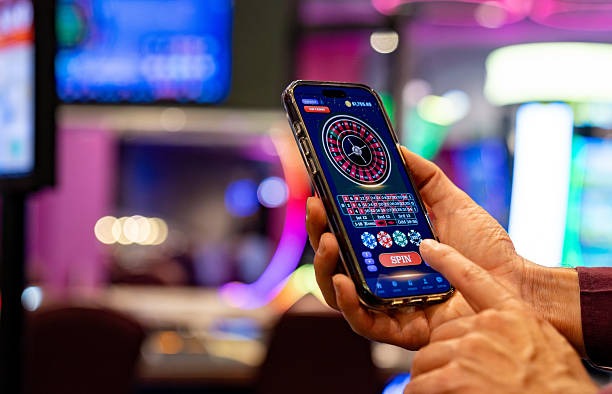
App vs browser: why we offer both
Our m11toto app (APK or PWA) caches your account data, entry history, and market data locally. This means you can view your balance and recent entries even without internet—useful when you're in transit or in areas with spotty coverage. The app also sends push notifications for live-score updates, market changes, and withdrawal confirmations. Browser access on desktop or mobile gives you the full m11toto experience but requires an active connection. Both paths use the same backend, so your account, balance, and entry history sync instantly across devices. We recommend the app for frequent users in Jakarta, Surabaya, Bandung, and Medan who want offline access and notifications; browser access suits occasional users or those who prefer not to install software.
Device compatibility for m11toto
Our m11toto app runs on Android 7.0 and later, and iOS 12.0 and later. Most devices released in the past five years meet these requirements. If your device is older, you can still access m11toto through your browser—no installation needed. We test m11toto on common devices and screen sizes, but we cannot guarantee compatibility with every device variant. If you experience crashes or display issues, try clearing your browser cache, updating your device's operating system, or reinstalling the app.
Troubleshooting common installation issues
Android users may see a warning that m11toto is from an "unknown source" because we distribute the APK directly rather than through an app store. This is normal and safe—we sign our APK with a security certificate. To proceed, tap "Install anyway" or enable "Unknown sources" in your device settings. If the APK fails to download, check that you have enough storage space and that your browser allows downloads. iOS users who cannot add m11toto to their home screen should ensure they are using Safari (not Chrome) and that their iOS version is up to date. If the web app does not install, try clearing your browser cache and reloading the site. If problems persist, contact our support team through the FAQ page.

Data, permissions, and account security on m11toto
Our m11toto app requests permission to access your device's storage (to cache data), camera (for KYC identity verification), and notifications (for live-score alerts). We do not access your contacts, photos, or other personal files. Your login credentials are encrypted and never stored in plain text. Payment information is tokenised—we store a reference token, not your actual card or bank details. When you sign out, we clear your session data from the device. If you lose your phone, sign in to m11toto from another device and change your password immediately. We will invalidate all other sessions, and your account will be secure. For more details, see our Privacy policy
Why m11toto mobile matters
Football tournaments like Liga 1, Piala Indonesia, Piala AFF, and Champions League run on fixed schedules, and live-dealer tables operate around the clock. Mobile access means you can follow matches and place entries from anywhere—at home, at work, or while travelling. Our m11toto app is optimised for slow networks, so it works even on 3G or congested WiFi. We regularly update the app with new markets, faster load times, and improved security. Whether you use Android, iOS, or a web browser, m11toto gives you the same account, the same markets, and the same payment options. Our support team in Jakarta, Surabaya, Bandung, and Medan is available to help with installation, account access, or technical issues.